
Many business‑critical applications rely on ISAM (Indexed Sequential Access Method) databases. They’re everywhere—vertical market software, line‑of‑business systems, financial accounting packages, and countless legacy-but-still-essential PC/server applications.
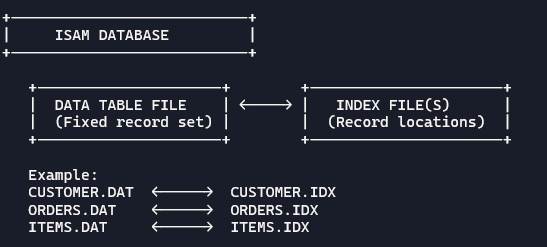
ISAM databases store data in fixed table files, with separate index files that track record locations. They’re fast, efficient, and ideal for read‑heavy workloads, which is why so many vendors continue to use them.
Below is a simplified diagram of how a typical vertical application would organize its data in an ISAM database.
But to backup software, simple doesn’t always mean easy.
ISAM databases come with a challenge: they don’t behave like modern relational databases when it comes to backups. And this is exactly where most cloud backup services quietly fail their customers.
The Ideal Backup Scenario (That Almost Never Happens)
The gold standard for backing up any application database is simple:
- Shut down the application
- Log out all users
- Ensure all data files are closed
- Perform the backup
In this perfect world, any backup tool—cloud or local—can safely capture a clean, consistent copy of the database files.
But we don’t live in that world.
Users stay logged in. Applications run 24×7. Maintenance windows are rare. And ISAM databases often remain open for days or weeks at a time.
So… today’s highly-automated backup software must deal with open, actively used files and still produce (at least) a crash‑consistent backup set.
The Hidden Problem: ISAM Files Don’t Update Their Timestamps While Open
Here’s the trap that catches most cloud backup services:
When an ISAM table file is open, an application may write thousands of changes to it—but the modified date/time (or archive flag) often do not update until the file is closed by the operating system.
If a backup program relies solely on incremental logic (e.g., “backup only files whose timestamps changed”), it will not see all file updates.
Here is a diagram of a typical cloud backup program.
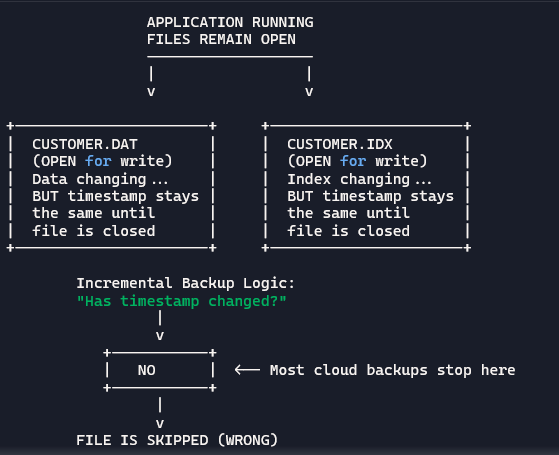
You can see the problem. If the backup doesn’t see the updates, it won’t trigger open‑file backup technology like Windows VSS snapshots.
The result?
The most important files in the entire application are silently skipped!
This is why so many businesses discover—too late—that their cloud backup provider never actually captured ALL of their current ISAM database. Oh no Mr. Bill….
How Dr.Backup Solves the ISAM Backup Problem
Dr.Backup is engineered to handle real‑world application behavior — not just picture perfect scenarios. We’ve been protecting ISAM‑based systems for decades, and we’ve built specific technology to ensure these databases are backed up accurately.
Two methods are available to Dr.Backup clients.
Full‑File Selection (Historical Method)
For years, we custom-configured ISAM application backup jobs to use the FULL BACKUP selection criteria. This guarantees every table and index file is backed up—whether it changed or not. (Note: Most cloud backup programs don’t even have this capability.)
This method is bulletproof, but not necessarily optimal. Large ISAM application databases can contain thousands of files, many of which rarely change. So in those cases, this method can be storage inefficient.
So we engineered something better.
MDT‑Open: A Smarter, Purpose‑Built Incremental Backup Mode
Recent versions of Dr.Backup include a specialized incremental selection mode called MDT‑Open (Modified Date/Time – Check If Open). It was designed specifically to handle ISAM‑style databases.
Here’s how it works:
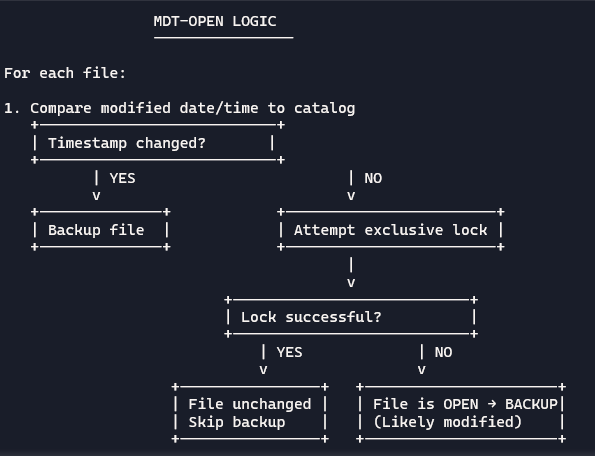
- We compare the file’s modified date/time to our catalog of backed up files.
If the modified date timestamp of a file changed, we back it up—standard incremental logic.
- If the timestamp did NOT change, we perform an additional test:
We attempt to take out an exclusive write lock on the file.
- If we CAN take the lock:
The file is not open for writing. It likely hasn’t changed.
→ No backup needed.
- If we CANNOT take out the lock:
The file is open and likely in use by the application.
→ We use VSS to back it up—even though the timestamp didn’t change.
This picture illustrates the logic we employ.
This technique is incredibly powerful. It ensures:
- All changed ISAM files are captured
- Files that are open (and therefore likely modified) are captured
- Files that truly haven’t changed are skipped
The result is a high‑fidelity, crash‑consistent backup without the overhead (inefficiency) of backing up thousands of unchanged files.
Why This Matters
The worst time to discover your cloud backup provider can’t reliably protect an ISAM database is during a restore request—when your client’s business is down and the data they need simply isn’t there.
Most “commodity” cloud backup software will restore ISAM databases – but the restored data is an inconsistent mish-mash of files backed up at different times. This results in a corrupted application database with mismatched and missing data.
Is your cloud backup service a ticking time bomb for ISAM‑based applications?
Everything looks like it’s working… until the day your client experiences a data disaster.
Dr.Backup clients sleep better because they know we’ve engineered around these real‑world challenges.
If you’re an IT Professional that wants your small business customers better protected – start with this link.